Reverse engineering · embedded hardware · 2026
Resurrecting a 2003 SignWaveZ MicroMarq badge.
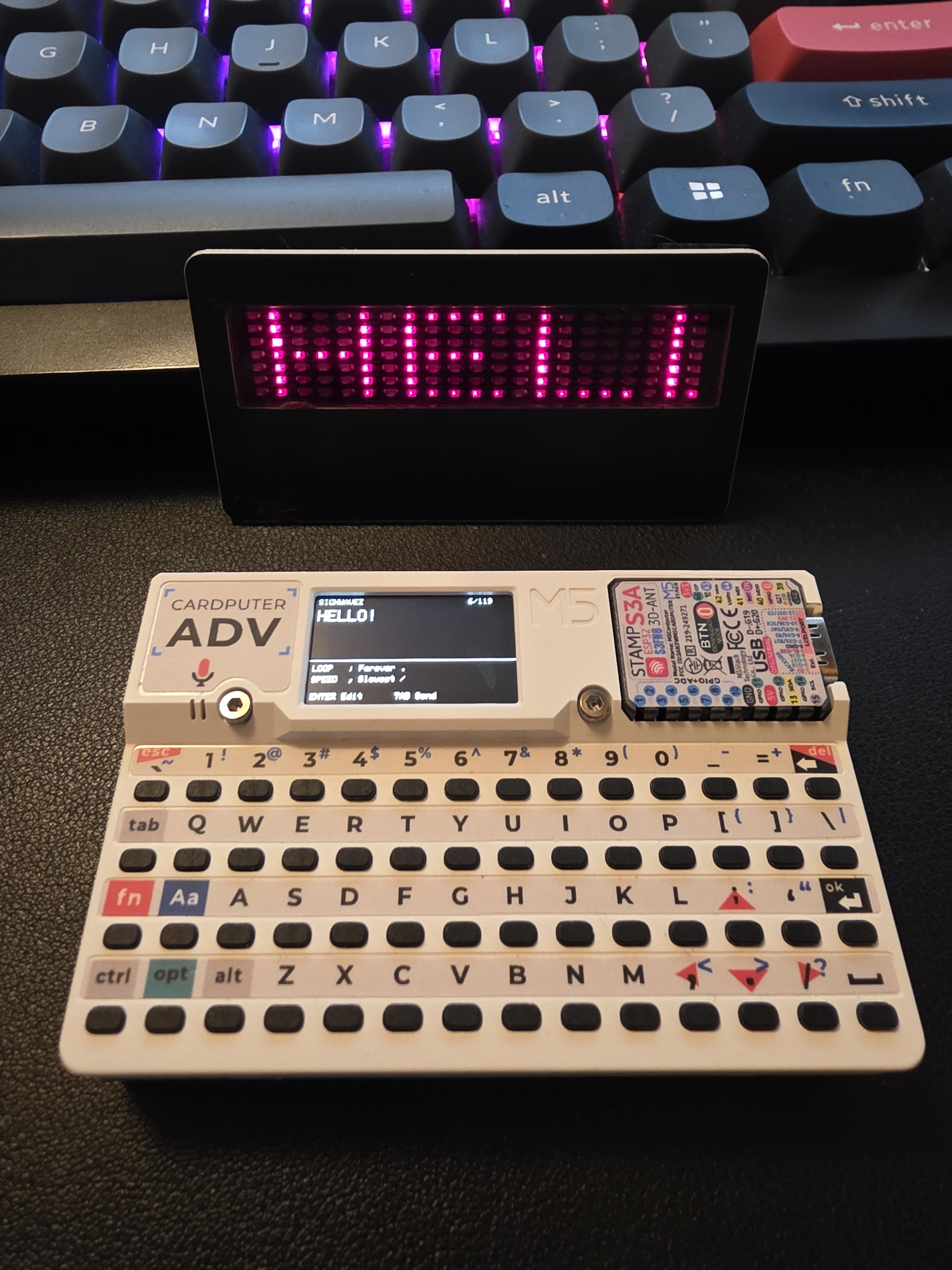
A 2003 scrolling LED badge had been sitting in a parts drawer for more than twenty years because its programmer was obsolete. A few hours with the original Windows software, a virtual serial port, an M5Stack Cardputer ADV, and ChatGPT turned it back into usable hardware.
Twenty years in a parts drawer
This project started because I was looking for something completely unrelated.
I was digging through one of my parts drawers looking for a microSD adapter when I found an old SignWaveZ scrolling LED badge.
My mom and I bought a couple of them sometime around 2003 to wear to computer swap meets. Instead of ordinary name tags, we had little scrolling LED displays. They were cool.
The badges were designed for the Windows XP era, when a serial port and a little infrared transmitter were still perfectly ordinary parts of a PC setup. Unfortunately, SignWaveZ didn't last very long. Computers stopped having serial ports, the software became increasingly difficult to run, and at some point I could no longer program the badges at all.
So into the parts bin they went.
They stayed there for more than twenty years, moving from house to house along with the rest of my accumulated computer junk.
Finding one again left me with an obvious question: could I make this thing useful again?
Protocol archaeology
Before I could reverse-engineer the badge, I first had to find the software that knew how to talk to it.
That turned into its own little archaeological expedition. We searched through old message boards, forum posts, and whatever scraps of information were still indexed for SignWaveZ and the MicroMarq.
Eventually, we unearthed an old Reddit post from someone who had apparently gone down the same rabbit hole years earlier. They pointed to what appears to have been the only archived capture of the original SignWaveZ site in the Wayback Machine.
Miraculously, that archived copy still had the original programming software available for download.
Suddenly I had something much more useful than guesses: the actual Windows program that had originally programmed the badge.
I spun up a Windows 7 Professional virtual machine in VirtualBox. There wasn't anything particularly magical about Windows 7; I still had the ISO, I had a license for it, and it was old enough to run the SignWaveZ software without complaint.
The next problem was figuring out what the program was actually sending.
I configured the VM's COM1 port as a VirtualBox named pipe, and ChatGPT helped me put together a small Python program on the host to capture every byte the original software wrote to the virtual serial port.
From there, the process became wonderfully methodical:
- Change one setting in the original software.
- Capture the resulting serial data.
- Compare it with previous captures.
- Figure out which bytes changed and why.
- Build a small test for the Cardputer.
- Point it at the real badge and see whether our theory survived contact with hardware.
The first big discovery was that every transmission was exactly 128 bytes, regardless of how short the message was.
That gave us something concrete to work with. We could change the message, speed, loop count, or device settings one at a time and watch the packet change. Bit by bit, the structure started to emerge.
Then came the first real hardware test.
The badge displayed an uppercase A.
First try.
That was the moment we knew the basic transport was right.
Longer messages exposed another problem. Short tests could sometimes work, but full messages became corrupted until we noticed that the original software was starting a new byte roughly every 31.25 milliseconds.
Once we reproduced that pacing, the transmissions became reliable.
After that, we spent another hour or so poking at the badge's character set, testing byte values to find out what produced useful characters, blanks, strange symbols, corrupted state, or occasional PIC weirdness.
By the end of the night, the twenty-year-old badge had a working modern programmer.
ChatGPT
This is what I think ChatGPT is actually good for.
There is plenty of justified criticism around generative AI, especially when it is used to imitate artists, flood the internet with disposable slop, or replace people whose creativity and judgment are the entire point of the work.
This project was something very different.
As Dr. McCoy might put it: damn it, Jim, I'm a network administrator, not a programmer.
I can read code and usually follow the logic of what it is doing. Given enough time — and I mean a lot of time — I can put together simple programs from documentation, examples, and bits and pieces I've found elsewhere.
But I've never considered myself a programmer.
That is where ChatGPT became incredibly useful.
I had a twenty-year-old piece of undocumented hardware, a copy of its original Windows software, and a way to capture whatever that software sent over a serial port. ChatGPT gave me a technical collaborator that could help with the part of the investigation where I was weakest.
I would change a setting in the original program, capture the packet, and hand over the new data. ChatGPT could compare it with previous captures, spot patterns, suggest what individual bytes might represent, and quickly turn those ideas into small test programs for the Cardputer.
Then I pointed the Cardputer at the actual badge and found out whether the theory was right.
Sometimes it was.
Sometimes it wasn't, and the badge got the final vote.
That loop was the useful part: observe, compare, hypothesize, test, repeat.
ChatGPT didn't replace the reverse engineering. I still had to find the hardware, recover the original software, set up the virtual machine, capture the data, run the experiments, watch what happened on the real device, and decide what actually worked.
What it gave me was another set of eyes, a very fast scratchpad, and a collaborator that could turn an idea into testable code far faster than I could have written it myself.
That distinction matters to me. I wasn't asking AI to replace the interesting part of the work. It was helping me get through the parts where my limited programming experience would otherwise have slowed the investigation to a crawl.
That's the kind of AI use I find compelling: helping someone investigate, understand, and build something they might otherwise not have the technical background to tackle on their own.
The transport
Once we understood the packet itself, the next question was how those bytes were actually getting from the original programmer to the badge.
At first glance, infrared suggested one of the usual consumer IR protocols, like NEC or RC5.
It wasn't.
There was no 38 kHz carrier, no pulse-distance encoding, and no familiar remote-control protocol hiding underneath.
The badge was doing something much simpler: raw serial data transmitted as infrared light.
In other words, the infrared LED is effectively standing in for a serial wire. A UART logical HIGH becomes the LED-off state, and logical LOW becomes LED-on, which is why the optical polarity is inverted.
The Cardputer ADV already has an infrared LED built in on GPIO 44, so once we knew the timing and polarity, there was no need for a separate transmitter.
The original setup was very much a product of its time: a Windows XP-era PC, a proprietary serial cable, and an infrared LED dongle hanging off the end of it.
The replacement is a roughly $40 ESP32-based handheld with its own keyboard, display, battery, and built-in infrared LED.
No PC, no serial cable, no proprietary dongle. Just a pocket-sized programmer that can do the whole job by itself.
The packet
Once the transport was understood, the packet itself turned out to be surprisingly simple.
Every transmission is exactly 128 bytes: a 9-byte header followed by a 119-byte message payload.
01
fixed
55
sync
AA
sync
LL
loops
XX
device
XX
device
XX
device
SS
speed
31
1 message
...
119-byte message payload
A known-good header for a normal one-message MARQ transmission looks like this:
The first three bytes are fixed. The next fields contain the loop count, device-family values, scroll speed, and message count. The remaining 119 bytes are the message itself.
Short messages are simply padded with zeroes. There is no checksum and no special terminator at the end of the message.
The speed setting was especially easy to identify because changing it in the original software changed only a single byte:
| Speed | Byte |
|---|---|
| Slowest | 0x39 ('9') |
| Slower | 0x37 ('7') |
| Slow | 0x35 ('5') |
| Normal | 0x34 ('4') |
| Fast | 0x33 ('3') |
| Faster | 0x32 ('2') |
| Fastest | 0x31 ('1') |
The encoding is a little odd by modern standards, but it also made the reverse engineering easier. Once we knew what to look for, several of the fields were hiding in plain sight as ASCII digits.
The modern replacement
Once the protocol was understood, the rest of the project became much more straightforward: turn the Cardputer ADV into a complete replacement for the original SignWaveZ programmer.
The finished firmware lets me type a message directly on the Cardputer's keyboard, choose the scroll speed and loop setting, and transmit the message through its built-in infrared LED.
Lowercase text is automatically converted to uppercase, just like the original software, and the application runs from M5Launcher.
Normal mode:
;      previous loop setting
.      next loop setting
,      slower
/      faster
ENTER  edit message
TAB    transmit

Edit mode:
type normally
lowercase becomes uppercase
Backspace deletes
ENTER exits edit mode
A full transmission takes about four seconds.
The result is exactly what I wanted when I pulled the badge out of that drawer: I can pick up one small handheld device, type a message, point it at the badge, and program hardware that had effectively been stranded in 2003.
Source & downloads
The complete project is on GitHub, including the Cardputer firmware source, the tested M5Launcher binary, the Python capture utility, representative packet captures, and the reverse-engineering notes.
Tested binary SHA-256:
b2c955aba0689e2060730d1523b77696c0f98593f3514ade0f73922e6fbcb0c7